> ## Documentation Index
> Fetch the complete documentation index at: https://private-7c7dfe99-vortex-format.mintlify.site/llms.txt
> Use this file to discover all available pages before exploring further.
> 在 Postgres 与各类数据格式、对象存储之间导入和导出数据。
# chdb 扩展参考文档
简介
该库提供了一组 PostgreSQL 扩展,可在 Postgres 中执行 [chDB] 查询,并在多种数据格式与对象存储之间复制数据。
chdb 扩展
`chdb` 扩展用于运行 [chDB] 查询。`chdb_query()` 函数执行单条查询。例如,以下查询:
```sql theme={null}
SELECT * FROM chdb_query($$
SELECT * FROM s3('s3://datasets-documentation/my-test-bucket-768/some_prefix/some_file_1.csv')
$$) AS (id int, months int, days int);
```
输出:
```
id | months | days
----+--------+------
1 | 2 | 3
3 | 2 | 1
4 | 5 | 6
(3 rows)
```
详情请参阅 [chdb 文档](/zh/products/managed-postgres/extensions/chdb/chdb)。
chdb\_hook 模块
`chdb_hook` 模块挂接到 [COPY] 命令,可将数据复制到 S3、GCS、Azure Blob、文件或 http URL,也可从这些位置复制数据。以下示例通过单条 [COPY] 命令从 S3 上的多个 CSV 文件中加载记录:
```sql theme={null}
CREATE TABLE times (
id INT NOT NULL,
months INT NOT NULL,
days INT NOT NULL
);
LOAD 'chdb_hook';
COPY times FROM 's3://datasets-documentation/my-test-bucket-768/{some,another}_prefix/some_file_{1..3}.csv';
```
之后,`times` 表中就包含了从每个已加载文件中读取的记录:
```pgsql theme={null}
# SELECT * FROM times;
id | months | days
----+--------+------
1 | 2 | 3
3 | 2 | 1
4 | 5 | 6
1 | 2 | 3
3 | 2 | 1
4 | 5 | 6
1 | 2 | 3
3 | 2 | 1
4 | 5 | 6
1 | 2 | 3
3 | 2 | 1
4 | 5 | 6
1 | 2 | 3
3 | 2 | 1
4 | 5 | 6
1 | 2 | 3
3 | 2 | 1
4 | 5 | 6
(18 rows)
```
[CREATE TABLE] 也可以从这样的 URL 推断出列结构,并加载其中的行:
```sql theme={null}
CREATE TABLE reviews () WITH (
copy_from = 'https://datasets-documentation.s3.eu-west-3.amazonaws.com/amazon_reviews/amazon_reviews_2015.snappy.parquet'
);
```
详情请参阅 [chdb\_hook 文档](/zh/products/managed-postgres/extensions/chdb/chdb_hook)。
有一项[benchmark]以约 100 万行 [NYC Taxi dataset] 数据为基础,在多种格式下将 \[chdb\_hook] 的 `COPY` 性能与 \[aws\_s3]、\[pg\_duckdb] 和 \[pg\_lake] 进行了对比。
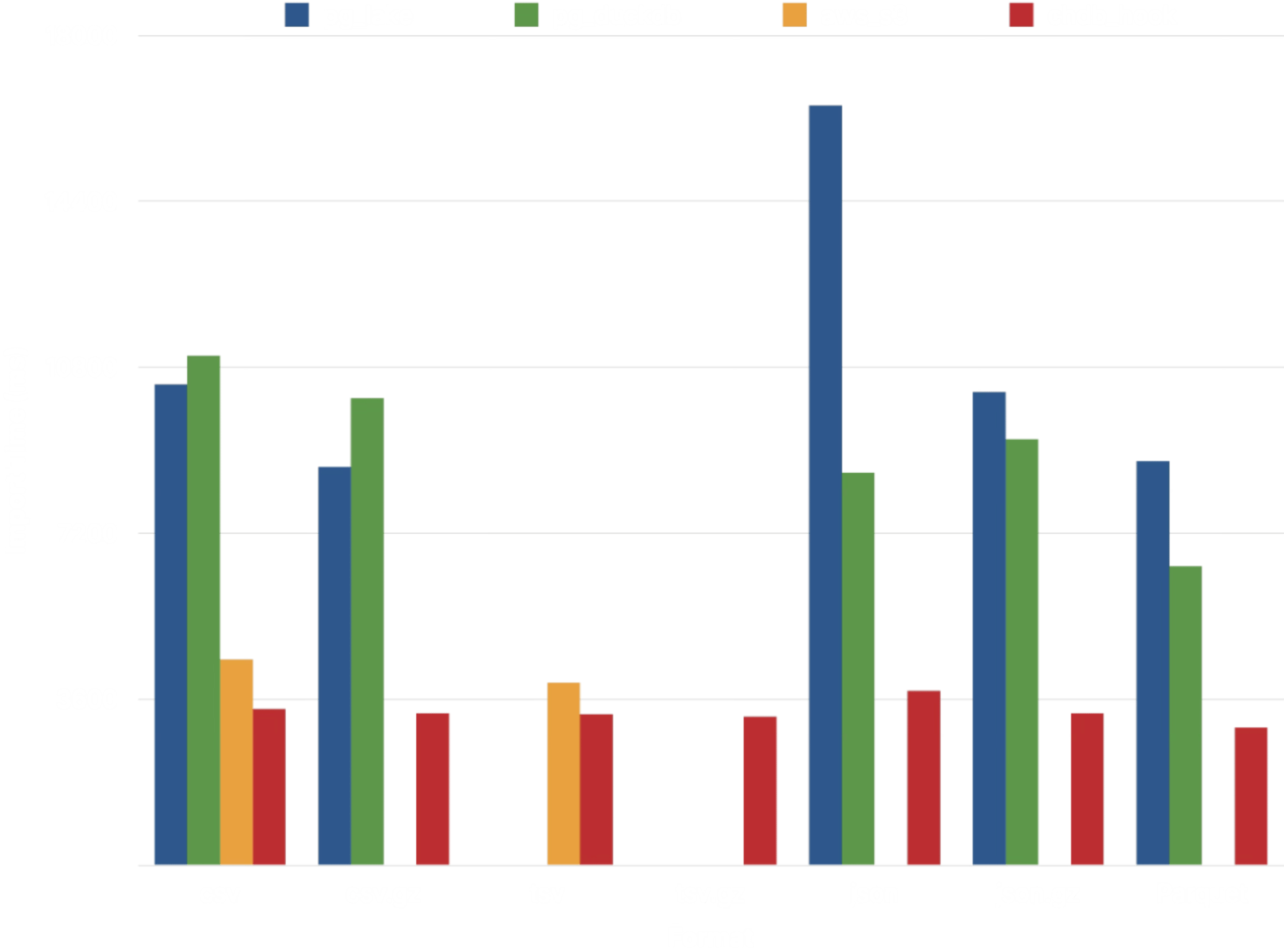 在这四个扩展中,[chdb] 的性能最为稳定。同样以 [DuckDB] 为底层的 \[pg\_duckdb] 和 \[pg\_lake],从 CSV、JSON 和 Parquet 导入数据的耗时约为其 2-3 倍。只有 \[aws\_s3] 的性能接近 \[chdb\_hook],但它支持的数据格式要少得多:
| Extension | Compression | 数据格式 |
| - | - | - |
| aws\_s3 | 无 | Text (TSV), CSV, Postgres Binary |
| pg\_lake | gzip, zstd, snappy (仅 Parquet) | CSV, JSON, Parquet |
| pg\_duckdb | gzip, zstd, snappy (仅 Parquet) | CSV, JSON, Parquet |
| chdb | gzip, zstd, lz4, bz2, snappy, brotli | TSV、CSV、JSON、BSON、Prometheus、Protobuf、Avro、Parquet、Arrow、XML、CapnProto、Markdown、MsgPack、ORC,以及[更多][formats]! |
进一步的基准测试表明,以多种格式导入 [NYC Taxi dataset] 时,性能相对稳定:
在这四个扩展中,[chdb] 的性能最为稳定。同样以 [DuckDB] 为底层的 \[pg\_duckdb] 和 \[pg\_lake],从 CSV、JSON 和 Parquet 导入数据的耗时约为其 2-3 倍。只有 \[aws\_s3] 的性能接近 \[chdb\_hook],但它支持的数据格式要少得多:
| Extension | Compression | 数据格式 |
| - | - | - |
| aws\_s3 | 无 | Text (TSV), CSV, Postgres Binary |
| pg\_lake | gzip, zstd, snappy (仅 Parquet) | CSV, JSON, Parquet |
| pg\_duckdb | gzip, zstd, snappy (仅 Parquet) | CSV, JSON, Parquet |
| chdb | gzip, zstd, lz4, bz2, snappy, brotli | TSV、CSV、JSON、BSON、Prometheus、Protobuf、Avro、Parquet、Arrow、XML、CapnProto、Markdown、MsgPack、ORC,以及[更多][formats]! |
进一步的基准测试表明,以多种格式导入 [NYC Taxi dataset] 时,性能相对稳定:
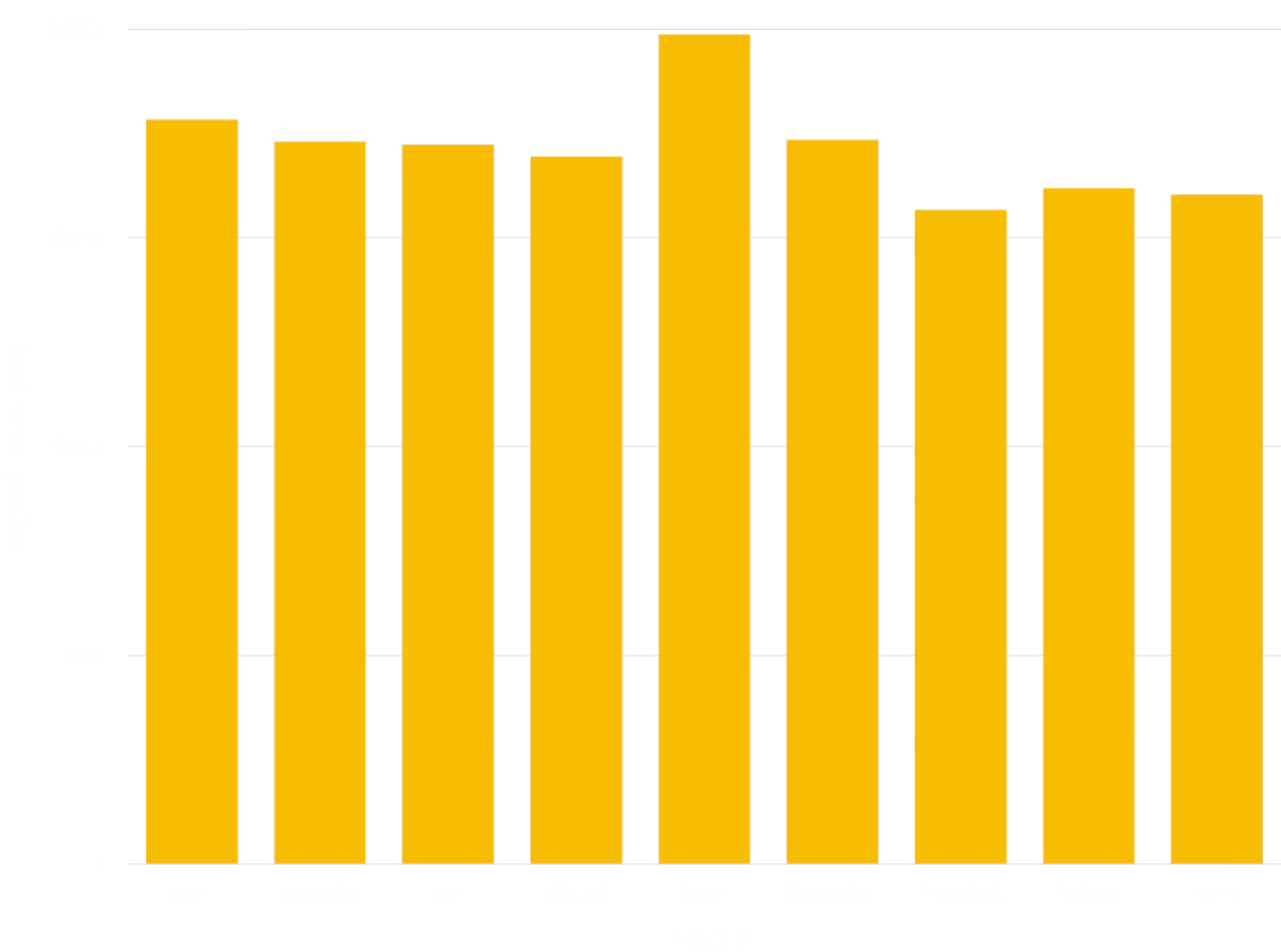 为与其他扩展保持可比性,该基准测试采用了 [JSONCompact] 格式;其他 JSON 数据格式 (例如 [JSONCompactEachRow]) 的性能会更接近上述其他格式。
架构
chdb 和 chdb\_hook 扩展依赖 `chdb_helper` 进程来执行 [chDB] 查询。该辅助进程将 [chDB] 的资源占用与 Postgres 主进程隔离开来,对于从数据湖加载数据这类偶尔才会用到的工作流而言,这是一大优势。
```
+-------------+
| helper |
+----------+ | app | +------+
| Postgres | | +---------+ | | chDB |
| Backend |----->| | chDB | |----->| Data |
+----------+ | | Library | | +------+
| +---------+ |
+-------------+
```
与 background worker 不同,该辅助进程不持有 Postgres 共享内存,postmaster 也不对其进行管理。因此崩溃被隔离开来,不会影响 Postgres。辅助进程一旦终止,只会在启动它的 backend 中引发一个错误,其他 session 则完全不受影响。
对于每个查询,该辅助进程都会连接到磁盘上一个新的临时 chDB database 来执行该查询。因此,目前每个查询都运行在与其他所有查询完全隔离的环境中。请不要 CREATE 一个表后,期望在后续查询中访问它。
依赖项
`chdb` 扩展 需要 PostgreSQL 15 或更高版本,以及 v26.7.0 或更高版本的 [chDB] library (目前仅支持 Linux 和 macOS) 。最简单的安装方式是使用 [lib.chdb.io] shell 脚本:
```sh theme={null}
curl -sL https://lib.chdb.io | bash
```
若要将 [chDB] 静态编译进辅助应用,请在运行 [安装](#compile-from-source)
`make` 命令之前设置以下变量。
```sh theme={null}
export BUNDLE_LIBCHDB=1 LIBCHDB_BUILD=static
```
`Makefile` 会下载静态 `libchdb` 库,并将其编译进应用中。
在 Linux 上,也可以在执行[安装](#compile-from-source)所需的 `make` 命令前设置 `export BUNDLE_LIBCHDB=1`,让安装过程改为下载并安装动态 `libchdb` 库。
从源码编译
要构建 chdb,只需执行以下操作:
```sh theme={null}
make
make installcheck
make install
```
如果遇到类似如下的错误:
```
"Makefile", line 8: Need an operator
```
你需要使用 GNU make,它在你的系统上很可能已经以
`gmake` 的名称安装:
```sh theme={null}
gmake
gmake install
gmake installcheck
```
如果遇到类似如下的错误:
```
make: pg_config: Command not found
```
请确保已安装 `pg_config` 并将其加入 path。如果你使用 RPM 之类的包管理系统安装 PostgreSQL,请确保同时安装了 `-devel` 包。必要时,可以为 build 过程指定它的所在位置:
```sh theme={null}
env PG_CONFIG=/path/to/pg_config make && make installcheck && make install
```
如果遇到类似如下的错误:
```
chdb_helper.c:22:10: fatal error: 'chdb.h' file not found
```
你需要安装 [chDB],或者告知编译器在何处查找它。例如,如果你是通过 [lib.chdb.io] 的 shell 脚本安装的,则将其指向 `/usr/local`:
```sh theme={null}
make CFLAGS=-I/usr/local/include \
LDFLAGS=-L/usr/local/lib
```
如果你遇到如下错误:
```
ERROR: must be owner of database regression
```
你需要使用 super user 运行 test suite,例如默认的
"postgres" super user:
```sh theme={null}
make installcheck PGUSER=postgres
```
若要在 PostgreSQL 18 或更高版本上将该 扩展 安装到 custom prefix 中,请向 `install` 传递 `prefix` argument (但不要传给其他 `make` 目标) :
```sh theme={null}
make install prefix=/usr/local/extras
```
然后确保以下 \[`postgresql.conf`
参数] 中包含该前缀:
```ini theme={null}
extension_control_path = '/usr/local/extras/postgresql/share:$system'
dynamic_library_path = '/usr/local/extras/postgresql/lib:$libdir'
```
作者
* [David E. Wheeler](https://justatheory.com/)
* [serprex](https://github.com/serprex)
版权
Copyright (c) 2026, ClickHouse
[chDB]: https://clickhouse.com/chdb "chDB - 快速、可靠、可扩展的进程内数据库"
[COPY]: https://www.postgresql.org/docs/current/sql-copy.html "Postgres 文档:COPY"
[CREATE TABLE]: https://www.postgresql.org/docs/current/sql-createtable.html "Postgres 文档:CREATE TABLE"
[lib.chdb.io]: https://lib.chdb.io "curl -sL https://lib.chdb.io | bash"
[`postgresql.conf` parameters]: https://www.postgresql.org/docs/devel/runtime-config-client.html#RUNTIME-CONFIG-CLIENT-OTHER
[chdb_hook]: https://pgxn.org/dist/chdb/doc/chdb_hook.html "PGXN 上的 chdb_hook 文档"
[aws_s3]: https://docs.aws.amazon.com/AmazonRDS/latest/UserGuide/USER_PostgreSQL.S3Import.html "将数据从亚马逊 S3 导入 RDS for PostgreSQL DB 实例"
[pg_duckdb]: https://github.com/duckdb/pg_duckdb "由 DuckDB 驱动的 Postgres,面向高性能应用与分析场景"
[pg_lake]: https://github.com/Snowflake-Labs/pg_lake "pg_lake:支持 Iceberg 与数据湖访问的 Postgres"
[formats]: https://clickhouse.com/docs/reference/formats/index "ClickHouse 文档:输入和输出数据格式"
[NYC Taxi dataset]: /get-started/sample-datasets/nyc-taxi "ClickHouse 文档:纽约出租车数据"
[benchmark]: https://github.com/ClickHouse/pg_chdb/tree/main/dev/benchmark "Postgres Lake Copy Benchmark"
[JSONCompact]: /reference/formats/JSON/JSONCompact "ClickHouse 文档:JSONCompact"
[JSONCompactEachRow]: /reference/formats/JSON/JSONCompactEachRow "ClickHouse 文档:JSONCompactEachRow"
[DuckDB]: https://duckdb.org "DuckDB:通用数据处理工具"