> ## Documentation Index
> Fetch the complete documentation index at: https://private-7c7dfe99-vortex-format.mintlify.site/llms.txt
> Use this file to discover all available pages before exploring further.
> Postgres에서 다양한 데이터 포맷과 객체 스토리지로 데이터를 가져오고 내보냅니다.
# chdb 확장 기능 참고 문서
소개
이 라이브러리는 Postgres에서 [chDB] 쿼리를 실행하고 다양한 포맷 및 객체 스토리지로 데이터를 복사하거나 그로부터 데이터를 가져올 수 있는 PostgreSQL 확장 기능을 제공합니다.
chdb 확장 기능
`chdb` 확장 기능은 [chDB] 쿼리를 실행합니다. `chdb_query()` 함수는 단일 쿼리를 실행합니다. 예를 들어 다음 쿼리는:
```sql theme={null}
SELECT * FROM chdb_query($$
SELECT * FROM s3('s3://datasets-documentation/my-test-bucket-768/some_prefix/some_file_1.csv')
$$) AS (id int, months int, days int);
```
Output:
```
id | months | days
----+--------+------
1 | 2 | 3
3 | 2 | 1
4 | 5 | 6
(3 rows)
```
자세한 내용은 [chDB 문서](/ko/products/managed-postgres/extensions/chdb/chdb)를 참조하십시오.
chdb\_hook 모듈
`chdb_hook` 모듈은 [COPY] 명령에 후크를 걸어 S3, GCS, Azure Blob, 파일 또는 http URL과 데이터를 주고받으며 복사합니다. 다음 예시는 단일 [COPY] 명령으로 S3에 있는 여러 CSV 파일의 레코드를 로드합니다:
```sql theme={null}
CREATE TABLE times (
id INT NOT NULL,
months INT NOT NULL,
days INT NOT NULL
);
LOAD 'chdb_hook';
COPY times FROM 's3://datasets-documentation/my-test-bucket-768/{some,another}_prefix/some_file_{1..3}.csv';
```
그 후 `times` 테이블에는 로드된 각 파일의 레코드가 포함됩니다:
```pgsql theme={null}
# SELECT * FROM times;
id | months | days
----+--------+------
1 | 2 | 3
3 | 2 | 1
4 | 5 | 6
1 | 2 | 3
3 | 2 | 1
4 | 5 | 6
1 | 2 | 3
3 | 2 | 1
4 | 5 | 6
1 | 2 | 3
3 | 2 | 1
4 | 5 | 6
1 | 2 | 3
3 | 2 | 1
4 | 5 | 6
1 | 2 | 3
3 | 2 | 1
4 | 5 | 6
(18 rows)
```
[CREATE TABLE]에서도 이러한 URL로부터 컬럼을 추론하고 행을 로드할 수 있습니다:
```sql theme={null}
CREATE TABLE reviews () WITH (
copy_from = 'https://datasets-documentation.s3.eu-west-3.amazonaws.com/amazon_reviews/amazon_reviews_2015.snappy.parquet'
);
```
자세한 내용은 [chdb\_hook 문서](/ko/products/managed-postgres/extensions/chdb/chdb_hook)를 참조하십시오.
[benchmark]는 다양한 포맷으로 저장된 약 100만 행 규모의 [NYC Taxi dataset]을 대상으로 \[chdb\_hook] `COPY`의 성능을 \[aws\_s3], \[pg\_duckdb], \[pg\_lake]와 비교합니다.
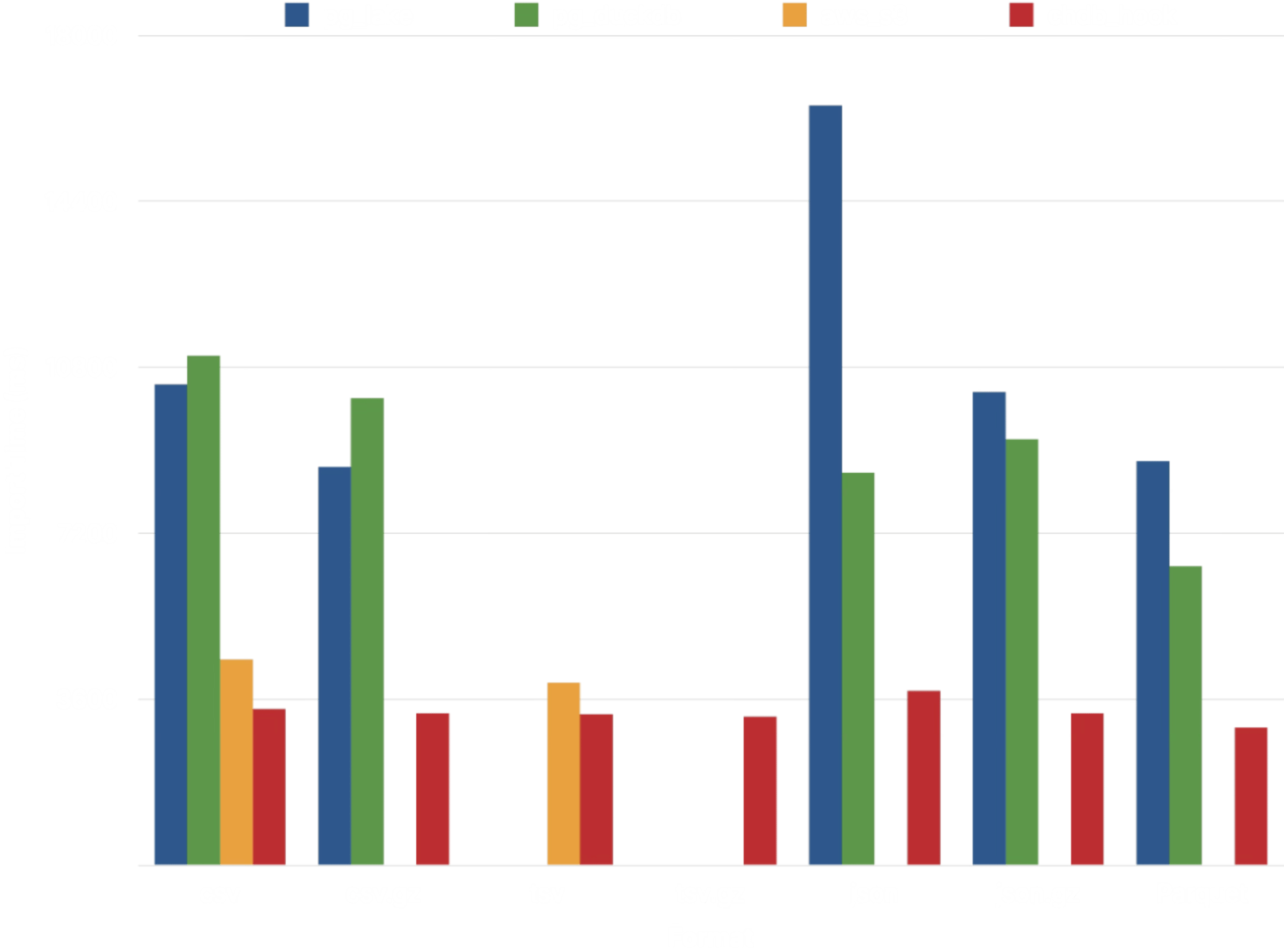 네 가지 확장 기능 중 [chdb]가 가장 일관된 성능을 보입니다. 모두 [DuckDB]를 기반으로 하는 \[pg\_duckdb]와 \[pg\_lake]는 CSV, JSON, Parquet에서 데이터를 가져오는 데 약 2\~3배의 시간이 걸립니다. \[aws\_s3]만이 \[chdb\_hook]에 근접한 성능을 보이지만, 지원하는 데이터 포맷의 범위는 훨씬 제한적입니다:
| Extension | Compression | Data 포맷 |
| - | - | - |
| aws\_s3 | none | Text (TSV), CSV, Postgres Binary |
| pg\_lake | gzip, zstd, snappy (Parquet only) | CSV, JSON, Parquet |
| pg\_duckdb | gzip, zstd, snappy (Parquet only) | CSV, JSON, Parquet |
| chdb | gzip, zstd, lz4, bz2, snappy, brotli | TSV, CSV, JSON, BSON, Prometheus, Protobuf, Avro, Parquet, Arrow, XML, CapnProto, Markdown, MsgPack, ORC, and [more][formats]! |
추가 벤치마킹에서도 다양한 포맷으로 [NYC Taxi dataset]을 가져올 때 비교적 일관된 성능이 나타납니다:
네 가지 확장 기능 중 [chdb]가 가장 일관된 성능을 보입니다. 모두 [DuckDB]를 기반으로 하는 \[pg\_duckdb]와 \[pg\_lake]는 CSV, JSON, Parquet에서 데이터를 가져오는 데 약 2\~3배의 시간이 걸립니다. \[aws\_s3]만이 \[chdb\_hook]에 근접한 성능을 보이지만, 지원하는 데이터 포맷의 범위는 훨씬 제한적입니다:
| Extension | Compression | Data 포맷 |
| - | - | - |
| aws\_s3 | none | Text (TSV), CSV, Postgres Binary |
| pg\_lake | gzip, zstd, snappy (Parquet only) | CSV, JSON, Parquet |
| pg\_duckdb | gzip, zstd, snappy (Parquet only) | CSV, JSON, Parquet |
| chdb | gzip, zstd, lz4, bz2, snappy, brotli | TSV, CSV, JSON, BSON, Prometheus, Protobuf, Avro, Parquet, Arrow, XML, CapnProto, Markdown, MsgPack, ORC, and [more][formats]! |
추가 벤치마킹에서도 다양한 포맷으로 [NYC Taxi dataset]을 가져올 때 비교적 일관된 성능이 나타납니다:
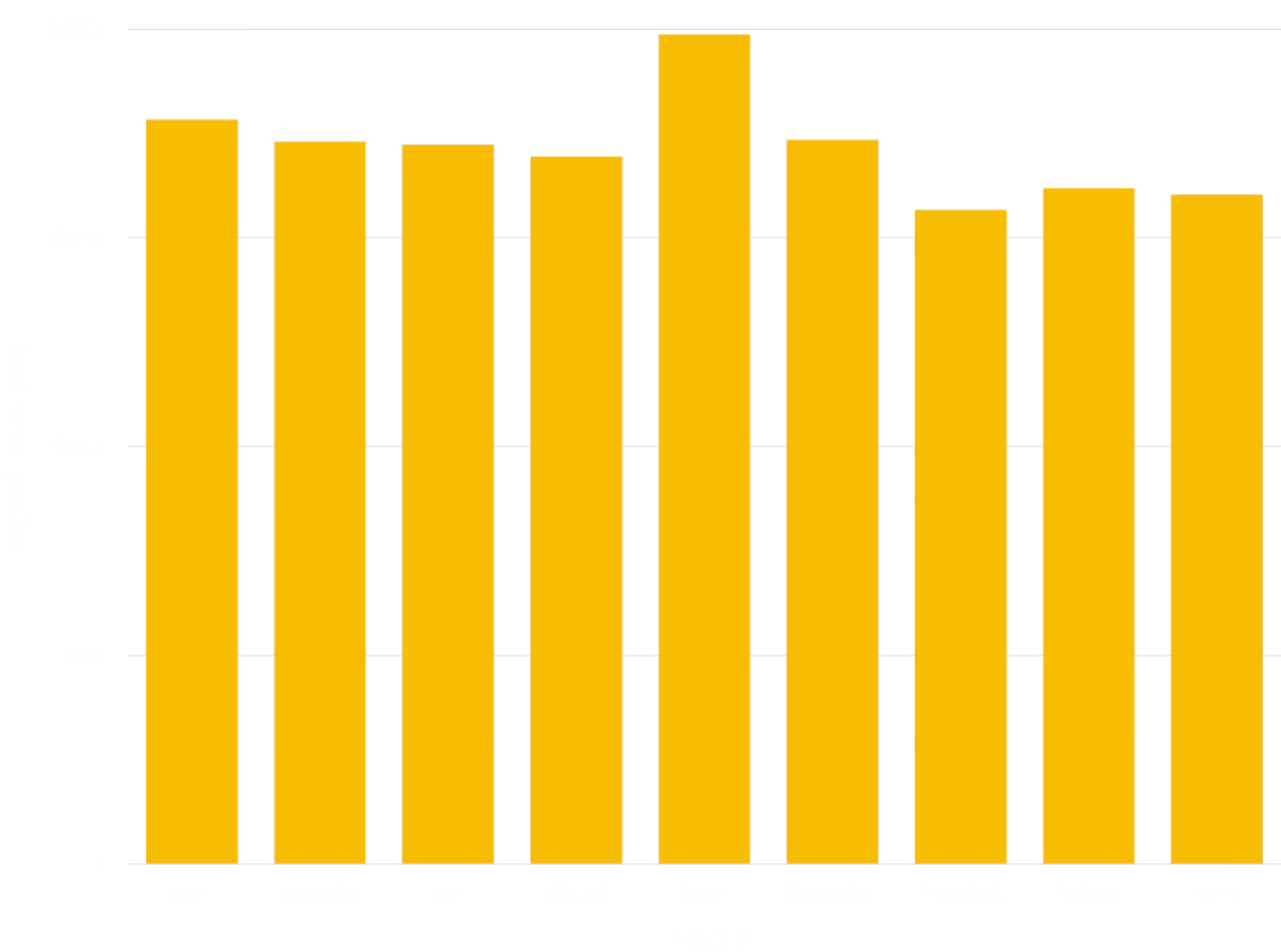 이 벤치마크는 다른 확장 기능과의 호환성을 위해 [JSONCompact] 포맷을 사용합니다. [JSONCompactEachRow]와 같은 다른 JSON 포맷을 사용하면 나머지 포맷들의 성능에 더 가까운 결과를 얻을 수 있습니다.
아키텍처
chdb 및 chdb\_hook 확장 기능은 [chDB] 쿼리를 실행하기 위해 `chdb_helper` 프로세스를 사용합니다. 이 헬퍼는 [chDB]의 리소스 사용량을 메인 Postgres 프로세스와 분리하므로, 데이터 레이크에서 데이터를 로드하는 것처럼 간헐적으로만 수행되는 워크플로우에서 유리합니다.
```
+-------------+
| helper |
+----------+ | app | +------+
| Postgres | | +---------+ | | chDB |
| Backend |----->| | chDB | |----->| Data |
+----------+ | | Library | | +------+
| +---------+ |
+-------------+
```
백그라운드 worker와 달리 헬퍼는 Postgres 공유 메모리를 점유하지 않으며, postmaster의 관리 대상도 아닙니다. 덕분에 크래시가 Postgres에 영향을 주지 않도록 격리됩니다. 헬퍼가 죽더라도 이를 시작한 backend에서만 오류가 발생하고, 다른 session은 영향을 받지 않습니다.
헬퍼는 쿼리를 실행할 때마다 디스크에 생성된 새로운 임시 chdb 데이터베이스에 연결합니다. 따라서 현재 각 쿼리는 다른 모든 쿼리와 완전히 격리된 상태로 실행됩니다. 테이블을 생성한 뒤 이어지는 쿼리에서 해당 테이블을 조회할 수 있다고 기대하지 마십시오.
의존성
`chdb` 확장 기능을 사용하려면 PostgreSQL 15 이상과 [chDB] 라이브러리 v26.7.0 이상이 필요합니다(현재 Linux와 macOS에서만 사용 가능). 가장 간단한 설치 방법은 [lib.chdb.io] 셸 스크립트를 사용하는 것입니다:
```sh theme={null}
curl -sL https://lib.chdb.io | bash
```
[chDB]를 헬퍼 앱에 정적으로 컴파일하려면 [설치](#compile-from-source)
`make` 명령어를 실행하기 전에 다음 변수를 설정하십시오.
```sh theme={null}
export BUNDLE_LIBCHDB=1 LIBCHDB_BUILD=static
```
`Makefile`은 정적 `libchdb` 라이브러리를 다운로드하여 앱에 컴파일해 넣습니다.
Linux에서는 [설치](#compile-from-source) `make` 명령어를 실행하기 전에 `export BUNDLE_LIBCHDB=1`을 설정하면, 설치 과정에서 동적 `libchdb` 라이브러리를 다운로드하여 설치하도록 할 수도 있습니다.
소스에서 컴파일하기
chdb를 빌드하려면 다음을 실행하십시오:
```sh theme={null}
make
make installcheck
make install
```
다음과 같은 오류가 발생하는 경우:
```
"Makefile", line 8: Need an operator
```
GNU make를 사용해야 하며, 시스템에 `gmake`라는 이름으로 이미 설치되어 있을 수 있습니다:
```sh theme={null}
gmake
gmake install
gmake installcheck
```
다음과 같은 오류가 발생하는 경우:
```
make: pg_config: Command not found
```
`pg_config`가 설치되어 있고 경로(PATH)에 포함되어 있는지 확인하십시오. RPM과 같은 패키지 관리 시스템으로 PostgreSQL을 설치했다면 `-devel` 패키지도 함께 설치되어 있는지 확인하십시오. 필요한 경우 다음과 같이 빌드 프로세스에 해당 위치를 지정하십시오:
```sh theme={null}
env PG_CONFIG=/path/to/pg_config make && make installcheck && make install
```
다음과 같은 오류가 발생하는 경우:
```
chdb_helper.c:22:10: fatal error: 'chdb.h' file not found
```
[chDB]를 설치하거나, 컴파일러에 chDB의 위치를 알려주어야 합니다. 예를 들어 [lib.chdb.io] 셸 스크립트로 설치한 경우 `/usr/local`을 지정하십시오:
```sh theme={null}
make CFLAGS=-I/usr/local/include \
LDFLAGS=-L/usr/local/lib
```
다음과 같은 오류가 발생하는 경우:
```
ERROR: must be owner of database regression
```
test suite는 기본 "postgres" super user와 같은 super user 계정으로 실행해야 합니다:
```sh theme={null}
make installcheck PGUSER=postgres
```
PostgreSQL 18 이상에서 사용자 정의 접두사에 확장 기능을 설치하려면 `install`에만 `prefix` 인수를 전달하십시오(다른 `make` 타깃에는 전달하지 마십시오):
```sh theme={null}
make install prefix=/usr/local/extras
```
그다음 해당 prefix가 다음 \[`postgresql.conf` 매개변수]에 포함되어 있는지 확인하십시오:
```ini theme={null}
extension_control_path = '/usr/local/extras/postgresql/share:$system'
dynamic_library_path = '/usr/local/extras/postgresql/lib:$libdir'
```
작성자
* [David E. Wheeler](https://justatheory.com/)
* [serprex](https://github.com/serprex)
저작권
Copyright (c) 2026, ClickHouse
[chDB]: https://clickhouse.com/chdb "chDB - 빠르고 안정적이며 확장 가능한 in-process 데이터베이스"
[COPY]: https://www.postgresql.org/docs/current/sql-copy.html "Postgres Docs: COPY"
[CREATE TABLE]: https://www.postgresql.org/docs/current/sql-createtable.html "Postgres Docs: CREATE TABLE"
[lib.chdb.io]: https://lib.chdb.io "curl -sL https://lib.chdb.io | bash"
[`postgresql.conf` parameters]: https://www.postgresql.org/docs/devel/runtime-config-client.html#RUNTIME-CONFIG-CLIENT-OTHER
[chdb_hook]: https://pgxn.org/dist/chdb/doc/chdb_hook.html "PGXN의 chdb_hook 문서"
[aws_s3]: https://docs.aws.amazon.com/AmazonRDS/latest/UserGuide/USER_PostgreSQL.S3Import.html "Amazon S3에서 RDS for PostgreSQL DB instance로 데이터 가져오기"
[pg_duckdb]: https://github.com/duckdb/pg_duckdb "고성능 애플리케이션 및 analytics를 위한 DuckDB 기반 Postgres"
[pg_lake]: https://github.com/Snowflake-Labs/pg_lake "pg_lake: Iceberg 및 데이터 레이크 액세스를 지원하는 Postgres"
[formats]: https://clickhouse.com/docs/reference/formats/index "ClickHouse Docs: Formats for input and output data"
[NYC Taxi dataset]: /get-started/sample-datasets/nyc-taxi "ClickHouse Docs: 뉴욕 택시 데이터"
[benchmark]: https://github.com/ClickHouse/pg_chdb/tree/main/dev/benchmark "Postgres Lake Copy Benchmark"
[JSONCompact]: /reference/formats/JSON/JSONCompact "ClickHouse Docs: JSONCompact"
[JSONCompactEachRow]: /reference/formats/JSON/JSONCompactEachRow "ClickHouse Docs: JSONCompactEachRow"
[DuckDB]: https://duckdb.org "DuckDB: 공통 데이터 랭글링 도구"